Kubernetes Worker Node Preparation on RHEL 9
Share the post "Kubernetes Worker Node Preparation on RHEL 9"

This post is a WordPress-ready, copy/paste guide for preparing a RHEL 9 machine as a Kubernetes worker node using kubeadm and a CRI-compatible container runtime (containerd). It is written for Kubernetes v1.35 (the version shown in the upstream kubeadm install docs) and is current as of March 15, 2026.
A Kubernetes node needs: (1) a working container runtime on every node so the kubelet can launch Pods, and (2) correctly configured networking (CNI) so Pods can communicate.
Conceptually, the worker node stack looks like this:
kubelet
  └─ CRI (gRPC) ──> containerd
                     ├─ OCI runtime (runc or crun)
                     └─ CNI plugins (/opt/cni/bin + /etc/cni/net.d)
Kubernetes uses the Container Runtime Interface (CRI) as the protocol between kubelet and the runtime, and for Kubernetes v1.26+ the runtime must support CRI v1 (or the node won’t register).
Overview and assumptions
This guide assumes:
- You are preparing a node named
worker-01with IP192.168.20.84. - You plan to install Kubernetes packages from pkgs.k8s.io for v1.35, following upstream kubeadm docs.
- You want containerd 2.x (recommended for Kubernetes 1.35) rather than Docker Engine. Kubernetes doesn’t talk to Docker directly anymore; Docker needs an extra shim (
cri-dockerd) because Docker Engine itself does not implement CRI.
Important version note (containerd): the containerd project publishes a Kubernetes compatibility matrix. For Kubernetes 1.35, they recommend containerd 2.2.0+ (or 2.1.5+ / 1.7.28+, depending on branch). That means a 2.1.0-beta.0 build is not aligned to the stated 1.35 recommendations.
Base OS configuration
Update RHEL 9 and install basic tools
Red Hat recommends DNF on RHEL 9; the yum command still works because it is an alias for DNF (useful for older scripts).
sudo dnf -y update
sudo dnf -y install vim wget curl
Set the hostname and ensure it resolves correctly
Kubernetes expects a unique hostname per node (and also unique MAC address and product UUID).
sudo hostnamectl set-hostname worker-01
bash
Edit your host resolution. You can use DNS, but if you’re using /etc/hosts, add the node’s real IP:
sudo vi /etc/hostsAdd (or ensure) a line like:
192.168.20.84 worker-01Avoid mapping worker-01 to 127.0.0.1. Keep loopback for localhost-type names; using loopback for the node name can cause components to “see” the node as local-only and break networking expectations in real clusters.
Optional (but recommended by kubeadm docs): verify identifiers are unique (especially important for cloned VMs).
ip link
sudo cat /sys/class/dmi/id/product_uuid
Required security and resource settings
Set SELinux to permissive
The upstream kubeadm install guide for Red Hat-based distributions instructs setting SELinux to permissive (effectively disabling enforcement) via setenforce 0 and a persistent config edit, and it explicitly warns this is required until kubelet SELinux support is improved.
sudo setenforce 0
sudo sed -i 's/^SELINUX=enforcing$/SELINUX=permissive/' /etc/selinux/config
getenforce
Expected output after getenforce is Permissive.
Disable swap
By default, the kubelet fails to start if swap is detected. The kubeadm docs recommend either disabling swap or explicitly configuring kubelet to tolerate it (failSwapOn: false) plus a swap behavior.
Disable swap immediately:
sudo swapoff -aDisable swap persistently (comment swap entries in /etc/fstab):
sudo sed -i.bak '/\sswap\s/s/^/#/' /etc/fstabIf you intentionally want swap for workloads, Kubernetes documents how to change kubelet’s default behavior and use LimitedSwap (default remains NoSwap).
Networking sysctls and kernel modules
Enable IPv4 forwarding
Kubernetes networking commonly needs IPv4 forwarding. The Kubernetes container runtime prerequisites show how to persist net.ipv4.ip_forward=1 via /etc/sysctl.d/k8s.conf and apply it with sysctl --system.
cat <<EOF | sudo tee /etc/sysctl.d/k8s.conf
net.ipv4.ip_forward = 1
EOF

sudo sysctl --system
sysctl net.ipv4.ip_forward
Enable bridge netfilter (br_netfilter) and bridge sysctls
Many Kubernetes networking setups depend on bridged traffic being visible to filtering / forwarding rules. Oracle’s Kubernetes-oriented documentation (for their Cloud Native Environment) calls out:
- ensuring
br_netfilteris loaded (and persisting it), and - setting bridge tunables (
net.bridge.bridge-nf-call-iptables,net.bridge.bridge-nf-call-ip6tables) alongsidenet.ipv4.ip_forward.
Load the module now and persist it:
sudo modprobe br_netfilter
echo "br_netfilter" | sudo tee /etc/modules-load.d/br_netfilter.conf
Append the bridge sysctls to your existing /etc/sysctl.d/k8s.conf (or create a separate file if you prefer):
cat <<EOF | sudo tee -a /etc/sysctl.d/k8s.conf
net.bridge.bridge-nf-call-ip6tables = 1
net.bridge.bridge-nf-call-iptables  = 1
EOF

sudo sysctl --system
Quick verification:
lsmod | grep br_netfilter || true
sysctl net.bridge.bridge-nf-call-iptables
sysctl net.bridge.bridge-nf-call-ip6tables
sysctl net.ipv4.ip_forward
Container runtime installation with containerd, CNI, and crictl
Kubernetes v1.35 requires a CRI-conforming runtime. containerd is a common choice.
This section follows upstream containerd guidance for installing from official binaries (tarball into /usr/local) and installing runc + CNI from their official release channels.
Choose versions that match Kubernetes 1.35
Per containerd’s own compatibility matrix for Kubernetes 1.35, choose one of:
- containerd 2.2.0+, or
- containerd 2.1.5+, or
- containerd 1.7.28+.
Below is an example using containerd 2.2.0 (meets the 1.35 recommendation). Adjust as needed.
Download and install CNI plugins
Kubernetes uses CNI plugins for networking, and the runtime must be configured to load them.
The kubeadm install docs show an example CNI download + extract to /opt/cni/bin.
The containerd “getting started” doc also uses /opt/cni/bin for plugin binaries.
# Pick a CNI plugins version.
# (Upstream kubeadm example uses v1.3.0; you can use newer if your environment requires.) citeturn4view0
CNI_PLUGINS_VERSION="v1.6.2"
ARCH="amd64"
sudo mkdir -p /opt/cni/bin /etc/cni/net.d
cd /tmp
wget -q "https://github.com/containernetworking/plugins/releases/download/${CNI_PLUGINS_VERSION}/cni-plugins-linux-${ARCH}-${CNI_PLUGINS_VERSION}.tgz"
sudo tar -C /opt/cni/bin -xzvf "cni-plugins-linux-${ARCH}-${CNI_PLUGINS_VERSION}.tgz"
Install an OCI runtime: runc or crun
containerd’s “getting started” doc describes installing runc from the official release channel, verifying checksums, and installing it as /usr/local/sbin/runc.
Example (using a stable runc release):
RUNC_VERSION="v1.4.1"
cd /tmp
wget -q "https://github.com/opencontainers/runc/releases/download/${RUNC_VERSION}/runc.amd64"
sudo install -m 755 runc.amd64 /usr/local/sbin/runc
/usr/local/sbin/runc --version
Alternatively, you can use crun (available as an RPM on RHEL-like systems) and configure containerd to use it as the default runtime (next step). containerd’s CRI config guide includes examples of setting the default runtime to crun and specifying BinaryName.
dnf install crun -y
ln -s /usr/bin/crun /usr/local/bin/runc
Install containerd from official binaries
containerd’s official documentation recommends extracting the release tarball under /usr/local and (for systemd) using their provided containerd.service unit file.
CONTAINERD_VERSION="2.2.0"
ARCH="amd64"

cd /tmp
wget -q "https://github.com/containerd/containerd/releases/download/v${CONTAINERD_VERSION}/containerd-${CONTAINERD_VERSION}-linux-${ARCH}.tar.gz"

# Install into /usr/local (this puts containerd binaries into /usr/local/bin)
sudo tar -C /bin -xzvf "containerd-${CONTAINERD_VERSION}-linux-${ARCH}.tar.gz" --strip-components=1 bin/
Install the upstream systemd unit:
sudo mkdir -p /etc/containerd

cat <<'EOF' | sudo tee /etc/containerd/config.toml
version = 3

# CRI runtime plugin (containerd 2.x)
[plugins."io.containerd.cri.v1.runtime"]
  # Optional: enable SELinux integration in the runtime plugin
  # (You may still be running SELinux in permissive mode per kubeadm docs.)
  enable_selinux = true

  [plugins."io.containerd.cri.v1.runtime".containerd]
    default_runtime_name = "crun"

    [plugins."io.containerd.cri.v1.runtime".containerd.runtimes.crun]
      runtime_type = "io.containerd.runc.v2"

      [plugins."io.containerd.cri.v1.runtime".containerd.runtimes.crun.options]
        BinaryName = "/usr/bin/crun"
        SystemdCgroup = true

  [plugins."io.containerd.cri.v1.runtime".cni]
    # containerd 2.1+ prefers bin_dirs (bin_dir is deprecated in 2.1)
    bin_dirs = ["/opt/cni/bin"]
    conf_dir = "/etc/cni/net.d"
EOF
Create the service file:
cat <<EOF > /etc/systemd/system/containerd.service
[Unit]
Description=containerd container runtime
Documentation=https://containerd.io
After=network.target local-fs.target

[Service]
ExecStartPre=-/sbin/modprobe overlay
ExecStart=/bin/containerd
Restart=always
RestartSec=5
Delegate=yes
KillMode=process
OOMScoreAdjust=-999
LimitNPROC=infinity
LimitCORE=infinity

[Install]
WantedBy=multi-user.target
EOF
That unit uses ExecStart=/usr/local/bin/containerd and pre-loads the overlay module.
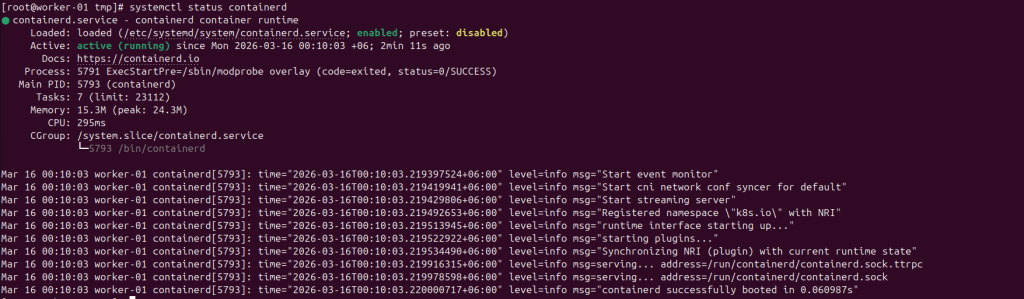
Enable and start:
sudo systemctl daemon-reload
sudo systemctl enable --now containerd
sudo systemctl status containerd --no-pager
Install crictl and point it at containerd
crictl is the common CLI for CRI debugging. cri-tools recommends matching the cri-tools minor version to your Kubernetes minor version.
Example for Kubernetes 1.35:
CRICTL_VERSION="v1.35.0"
cd /tmp
wget -q "https://github.com/kubernetes-sigs/cri-tools/releases/download/${CRICTL_VERSION}/crictl-${CRICTL_VERSION}-linux-amd64.tar.gz"
sudo tar -C /usr/local/bin -xzvf "crictl-${CRICTL_VERSION}-linux-amd64.tar.gz"
crictl --version
Kubernetes packages installation and verification checklist
Add the Kubernetes repository (pkgs.k8s.io) and install kubelet/kubeadm/kubectl
# This overwrites any existing configuration in /etc/yum.repos.d/kubernetes.repo
cat <<EOF | sudo tee /etc/yum.repos.d/kubernetes.repo
[kubernetes]
name=Kubernetes
baseurl=https://pkgs.k8s.io/core:/stable:/v1.35/rpm/
enabled=1
gpgcheck=1
gpgkey=https://pkgs.k8s.io/core:/stable:/v1.35/rpm/repodata/repomd.xml.key
exclude=kubelet kubeadm kubectl cri-tools kubernetes-cni
EOF
Install:
# For systems with DNF (RHEL 9)
sudo yum install -y kubelet kubeadm kubectl --disableexcludes=kubernetes
If your environment uses DNF5, kubeadm docs show the alternative flag:
sudo yum install -y kubelet kubeadm kubectl --setopt=disable_excludes=kubernetes
Optionally enable kubelet:
sudo systemctl enable --now kubeletIt’s normal for kubelet to restart in a crash loop until the node is initialized / joined with kubeadm (because kubelet waits for kubeadm to provide configuration)

Final quick validation (before kubeadm join)
These checks map directly to the common “preflight” failure points:
# Identity and uniqueness (important for VMs)
hostname
ip link | head
sudo cat /sys/class/dmi/id/product_uuid

# SELinux + swap
getenforce
swapon --show

# Networking
sysctl net.ipv4.ip_forward
sysctl net.bridge.bridge-nf-call-iptables
lsmod | grep br_netfilter || true

# Runtime health
sudo systemctl is-active containerd
sudo crictl info | head -n 20 || true

# Kubernetes components installed
kubelet --version
kubeadm version
kubectl version --client
At this point, the node is “prepared” and ready for the control plane to run a kubeadm join
firewall commands for master (control plane) and worker nodes:
🖥️ Master/Control Plane Node Commands
# API Server - essential for all cluster communication
firewall-cmd --permanent --add-port=6443/tcp
# etcd - only on master nodes (port range for etcd clients)
firewall-cmd --permanent --add-port=2379-2380/tcp
# Kubelet API - required on all nodes
firewall-cmd --permanent --add-port=10250/tcp
# Controller Manager - master only
firewall-cmd --permanent --add-port=10257/tcp
# Scheduler - master only
firewall-cmd --permanent --add-port=10259/tcp
# Calico BGP (if using Calico)
firewall-cmd --permanent --add-port=179/tcp
# Calico VXLAN (if using VXLAN)
firewall-cmd --permanent --add-port=4789/udp
# Calico Typha (if using Typha for scalability)
firewall-cmd --permanent --add-port=5473/tcp
# Restrict access to pod network
firewall-cmd --permanent --add-source=10.244.0.0/16
# Reload firewall
firewall-cmd --reload
⚙️ Worker Node Commands
# Kubelet API - required on all nodes
firewall-cmd --permanent --add-port=10250/tcp
# NodePort Services - for external access to applications
firewall-cmd --permanent --add-port=30000-32767/tcp
# Calico BGP (if using Calico)
firewall-cmd --permanent --add-port=179/tcp
# Calico VXLAN (if using VXLAN)
firewall-cmd --permanent --add-port=4789/udp
# Calico Typha (if using Typha)
firewall-cmd --permanent --add-port=5473/tcp
# Restrict access to pod network
firewall-cmd --permanent --add-source=10.244.0.0/16
# Reload firewall
firewall-cmd --reload
Install required SELinux and container policy packages
semanage is not always present by default; install the SELinux management utilities and the container SELinux policy package:
sudo dnf install -y policycoreutils-python-utils container-selinuxLabel /etc/kubernetes PKI paths for control-plane static Pods
Kubeadm uses /etc/kubernetes as a constant path and places static Pod manifests under /etc/kubernetes/manifests; it also stores kubeconfig files there and keeps PKI material under /etc/kubernetes/pki.
Relabel these paths so the static Pods can read certificates/keys under SELinux enforcing:
# Show current contexts before changing anything (optional but useful)
sudo ls -ldZ /etc/kubernetes /etc/kubernetes/pki || true
# Persistently map these trees to container_file_t
sudo semanage fcontext -a -t container_file_t '/etc/kubernetes(/.*)?'
sudo semanage fcontext -a -t container_file_t '/etc/kubernetes/pki(/.*)?'
# Apply the labels on disk
sudo restorecon -RFv /etc/kubernetes
# Verify after relabel
sudo ls -ldZ /etc/kubernetes /etc/kubernetes/pki# Enable the boolean persistently
sudo setsebool -P container_manage_cgroup on
# Verify it's enabled
sudo getsebool container_manage_cgroup
This is the same “define mapping → restorecon” pattern Red Hat documents for persistent labeling.
Switch SELinux to enforcing mode
Red Hat’s RHEL documentation describes that enforcing mode enforces policy and denies access if not allowed, and it documents making enforcing persistent by setting SELINUX=enforcing in /etc/selinux/config and rebooting.
A practical approach is:
# Temporary switch (until reboot)
sudo setenforce 1
getenforce
Then persist across reboot:
sudo sed -i 's/^SELINUX=permissive$/SELINUX=enforcing/' /etc/selinux/config
sudo reboot
After reboot:
getenforce
Red Hat notes that after switching into enforcing (especially if previously disabled), the system relabels files at boot; and it documents getenforce as the verification method.
Restart runtime and kubelet, then verify static Pods start cleanly
Now restart the runtime and kubelet (your original command supports either containerd or CRI-O):
sudo systemctl restart containerd || sudo systemctl restart crio
sudo systemctl restart kubelet
sleep 10
Then verify control-plane components are running (control-plane nodes only):
sudo crictl ps -a | egrep 'etcd|kube-apiserver'
This check aligns with kubeadm’s design: kubelet watches /etc/kubernetes/manifests for static Pods (including etcd and kube-apiserver), so these should appear in the runtime once kubelet successfully reconciles those manifests.