Adding a Jenkins Agent Using WebSocket (When Jenkins is Public and Agent is Local)
Share the post "Adding a Jenkins Agent Using WebSocket (When Jenkins is Public and Agent is Local)"
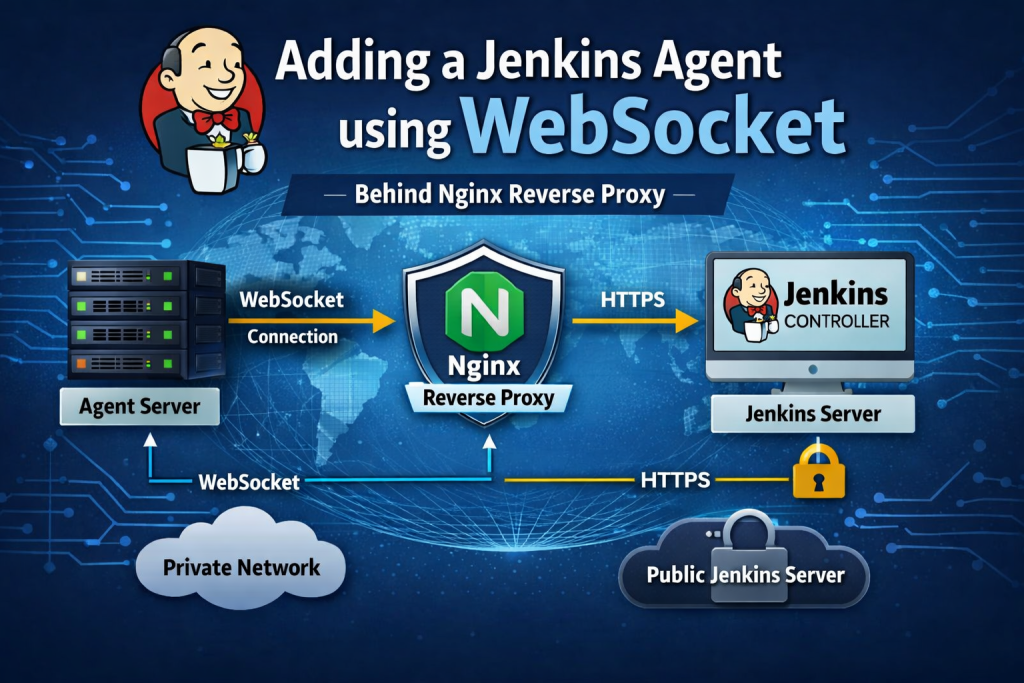
In many DevOps environments, the Jenkins controller is hosted on a public server, while the build agents are located inside private infrastructure or local networks. In such cases, connecting agents directly to Jenkins using traditional JNLP ports can be difficult because of firewall restrictions and network security policies.
A reliable solution is to use WebSocket-based Jenkins agents. This method allows agents to connect to Jenkins over HTTPS (port 443), which works easily through firewalls and reverse proxies.
In this guide, we will walk through how we recently deployed a Jenkins agent using WebSocket where the Jenkins server is public and the agent server is inside a local network.
Advantages of Using WebSocket Jenkins Agents
Using WebSocket-based agents provides several operational benefits:
1. No Need to Open Additional Ports
Traditional Jenkins agents require TCP port 50000 to be open between the agent and controller. WebSocket agents communicate over HTTPS (443), which is usually already allowed.
2. Works Behind Reverse Proxies
If Jenkins is running behind Nginx, Apache, or a Load Balancer, WebSocket agents can still connect without exposing internal services.
3. Firewall Friendly
Because the agent initiates the connection to Jenkins over HTTPS, no inbound firewall rules are required on the agent server.
4. Suitable for Hybrid Infrastructure
This setup works very well when:
- Jenkins is hosted in cloud or public infrastructure
- Agents are located in on-premise or private networks
5. Secure Communication
All communication happens over TLS/HTTPS, ensuring encrypted connectivity between the agent and controller.
Deployment Architecture
The architecture of this setup looks like this:
Local Agent Server
        │
        │ HTTPS + WebSocket
        ▼
Public Jenkins Server
The agent initiates the connection, so Jenkins does not need to reach the internal network.
Step 1 – Create a Jenkins Agent Node
Open Jenkins and navigate to:
Manage Jenkins → Nodes → New Node
Configure the node:
Node Name
Test-Agent
Node Type
Permanent Agent
Remote root directory
/home/jenkins
Launch Method
Launch agent by connecting it to the controller
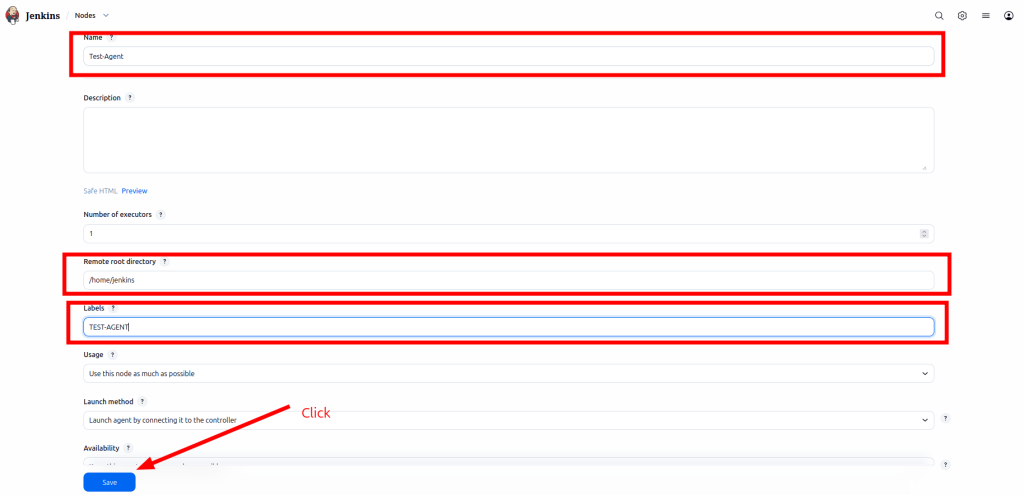
Save the configuration.
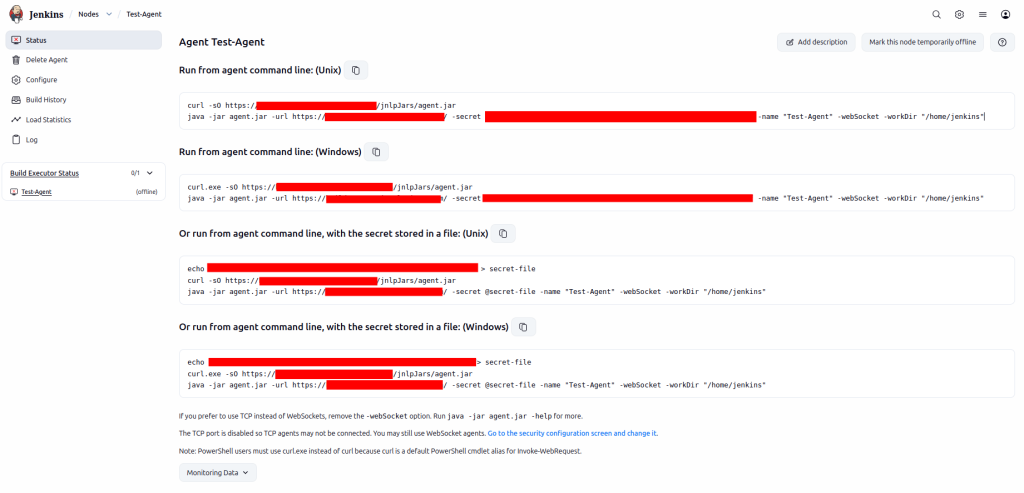
After saving, Jenkins will generate a command similar to:
curl -sO https://testjenkins.imhimel.com/jnlpJars/agent.jarjava -jar agent.jar \
-url https://testjenkins.imhimel.com/ \
-secret XXXXX \
-name "Test-Agent" \
-webSocket \
-workDir "/home/jenkins"
Step 2 – Prepare the Agent Server
Install Java on the agent server.
sudo apt update
sudo apt install -y openjdk-21-jdk
Create a working directory for the Jenkins agent:
sudo mkdir -p /opt/jenkins-agent
cd /opt/jenkins-agent
Download the Jenkins agent file:
curl -sO https://testjenkins.imhimel.com/jnlpJars/agent.jar
Step 4 – Run the Agent as a System Service (Recommended)
To ensure the Jenkins agent starts automatically after server reboot, configure it as a systemd service.
Create the service file:
sudo nano /etc/systemd/system/jenkins-agent.service
Add the following configuration:
[Unit]
Description=Jenkins Agent
After=network.target[Service]
User=root
WorkingDirectory=/opt/jenkins-agent
ExecStart=/usr/bin/java -jar /opt/jenkins-agent/agent.jar \
-url https://testjenkins.imhimel.com/ \
-secret @/opt/jenkins-agent/secret-file \
-name "Test-Agent" \
-webSocket \
-workDir "/home/jenkins"
Restart=always[Install]
WantedBy=multi-user.target
Reload systemd:
sudo systemctl daemon-reload
Enable the service:
sudo systemctl enable jenkins-agent
Start the agent service:
sudo systemctl start jenkins-agent
Check logs:
sudo journalctl -u jenkins-agent -f
Final Result
After completing these steps, the Jenkins agent will:
- Automatically connect to the Jenkins controller
- Run as a background service
- Reconnect automatically if Jenkins restarts
This approach allows teams to securely connect internal build servers to a public Jenkins controller without opening additional firewall ports.
WebSocket agents are therefore an excellent solution for modern DevOps environments with hybrid infrastructure.